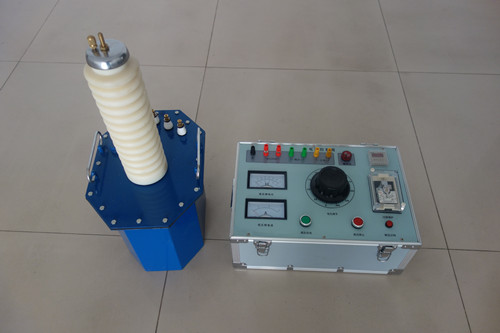


Inductive Load DC Resistance Tester
The DC resistance tester is a new generation of transformer DC resistance testing instruments. It can automatically select the test current according to different types of power transformers and display the test results at the fastest speed. The DC resistance tester also has functions such as storage, printing, and discharge indication. It is equipped with a built-in non-volatile memory that can save measurement data for a long time. The use of a liquid crystal display gives the instrument a good human-machine interface, making it the preferred equipment for DC resistance testing work. The DC resistance tester is a high-precision, wide-range resistance tester controlled by a high-performance microprocessor. It can test resistances from 1μΩ to 3MΩ with a maximum display of 30,000 counts. The highest test speed is 60 times/second. At a test speed of 15 times/second, it can still guarantee an accuracy of 0.05%, and the reading fluctuation can be controlled below 3 digits. It comes standard with a temperature compensation function, which can accurately test meter resistances. Three current modes can meet various stringent resistance testing requirements.
Transformer DC Resistance Tester (micro-ohmmeter) is a high-precision replacement product for DC single and double-arm bridges. The SX-2A transformer DC resistance tester adopts advanced switching power supply technology. It uses a four-and-a-half-digit LCD to display measurement results and a three-and-a-half-digit LCD to display ambient temperature or test current value, overcoming the disadvantage of other similar products with LED displays that are difficult to read in sunlight. It also has an automatic arc suppression function.
Functional Features
1. Uses a high-speed 16-bit A/D converter, providing stable measurement data and good repeatability.
2. Automatic programmable current source technology. The current source has a total of 1000 current gears, automatically controlled by the internal microcontroller according to the resistance being measured, thereby achieving a relatively wide measurement range and the best measurement state, without the need for manual current gear switching.
3. Highly intelligent design, can automatically detect faults such as loose or broken test leads.
4. Comprehensive protection functions, reliably protecting the instrument from back electromotive force impacts, with automatic discharge indication.
5. Can display measurement current and measurement time. Intelligent power management technology effectively reduces internal heating of the instrument.
6. Can store 120 measurement data records, which are not lost upon power failure. All Chinese menus and operation prompts are intuitive and convenient.
Technical Specifications
1. Measurement range: 1mΩ~2KΩ
2. Output current: 10A
3. Measurement accuracy: 0.2%±2 digits
4. Maximum resolution: 1uΩ
5. Power supply: AC220V±10%
6. Ambient temperature: -10~40℃ Operating method
◇ This machine is equipped with three buttons: "Select", "Confirm", and "Reset".
1. Resistance Measurement
After power-on or pressing the reset button, the instrument enters the initial state (1). At this time, the cursor pointer points to "Resistance". Press the "Confirm" button directly to enter state (2), which displays the changing charging current and measurement time. After charging is completed, it automatically enters state (3), displaying the resistance value, measurement current, and measurement time. At this time, each press of the "Confirm" button stores one measurement result (models with a printer also print the measurement result). Press the "Reset" button to exit resistance measurement and enter state (4), displaying the discharge current. After discharge ends, it automatically returns to the initial state (1), completing one resistance measurement.
2. Number Setting
Inputting the device number helps in searching memory data. In the initial state (1), point the cursor to "Settings" and press the "Confirm" button to enter state (5), displaying the current device number. Press the "Confirm" button again to enter state (6), prompting to input a new device number. At this time, pressing the "Select" button cycles the current input digit from '0' to '9', then from 'A' to 'Z'. After finding the desired number or letter, press the "Confirm" button to input that digit. Then input the next digit in the same way. After inputting six digits, it returns to state (5), displaying the newly input device number. Press the "Reset" button to return to the initial state (1).